
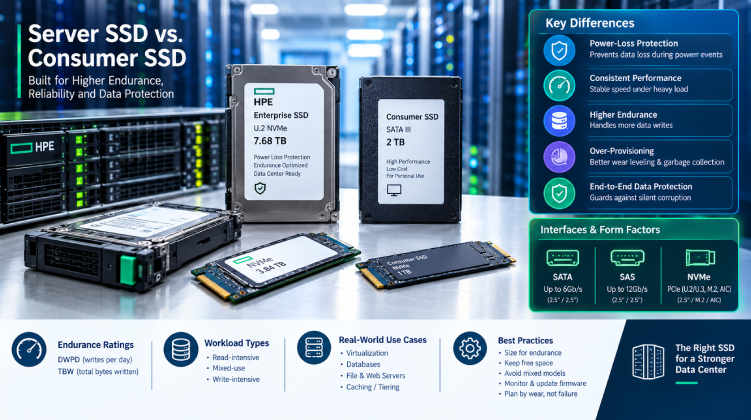
A consumer SSD can look like a bargain next to an enterprise model with the same capacity. It is just as fast in a benchmark, costs a fraction of the price, and installs in seconds. Then it goes into a database server, and six months later it is throttling, reporting wear warnings, or dropping out of the array after an unexpected power event.
Enterprise SSDs are not simply faster. They are built to behave predictably under sustained load, protect data during power loss, and last through years of heavy writes. This guide explains what separates the two, which specifications matter, and how to choose the right drive for your workload.
What Makes a Server SSD Different
The flash chips inside a consumer and an enterprise SSD may come from the same manufacturer. The differences lie in the controller, firmware, over-provisioning, and supporting hardware.
- Power-loss protection (PLP): Enterprise drives include capacitors that give the controller time to flush cached data to flash if power drops. Without PLP, in-flight writes can be lost or corrupted.
- Consistent performance: Consumer drives often post high peak speeds, then slow sharply once their cache fills. Enterprise drives are tuned for steady, predictable latency under constant load.
- Higher endurance: Enterprise models are rated for far more total data written over their lifetime.
- Greater over-provisioning: Extra hidden capacity helps the drive manage wear leveling and garbage collection without hurting performance.
- End-to-end data protection: Error checking along the full data path guards against silent corruption between the host and the flash.
For a home PC, these features are optional. For a server holding business data, they are the reason to pay more.
Understanding Endurance Ratings
Endurance is the most important number on an enterprise SSD datasheet, and it is usually expressed in one of two ways.
- DWPD (Drive Writes Per Day): How many times you can overwrite the drive’s full capacity each day throughout the warranty period.
- TBW (Terabytes Written): The total data the drive can absorb over its lifetime.
Manufacturers typically sort drives into three classes:
| Class | Typical DWPD | Best For |
| Read-intensive | Around 1 | Web serving, content delivery, boot drives, analytics reads |
| Mixed-use | Around 3 | Virtualization, general databases, email servers |
| Write-intensive | 10 or more | Heavy transactional databases, logging, caching tiers |
Do not pay for write-intensive endurance if your workload is mostly reads. Equally, do not put a read-intensive drive under a write-heavy database. Measure your actual daily write volume first, using your monitoring tools or the drive’s own SMART data, then choose a class with comfortable headroom.
Interface and Form Factor: SATA, SAS, or NVMe
The interface determines both performance and what your server can physically accept.
SATA SSDs
- Run at up to 6Gb/s and cost the least.
- Suit boot volumes, read-heavy workloads, and budget upgrades.
- Limited by a single-queue protocol that cannot take full advantage of flash.
SAS SSDs
- Run at 12Gb/s or higher with dual-port support for redundant paths.
- Fit shared storage arrays and high-availability designs.
- Remain common in servers built around SAS backplanes and controllers.
NVMe SSDs
- Connect directly over PCIe, delivering much higher throughput and far lower latency.
- Handle many parallel queues, which suits virtualization, databases, and AI or analytics workloads.
- Come in several form factors, including U.2/U.3 hot-swap drives, M.2 modules, and add-in cards.
Always confirm that your backplane and controller support the interface. An NVMe drive will not work in a SATA/SAS-only bay, and some servers need a specific controller or riser to enable NVMe slots.
Matching SSDs to Real Workloads
- Virtualization hosts: Mixed-use SAS or NVMe drives handle the random, concurrent I/O that many virtual machines generate.
- Databases: Mixed-use or write-intensive NVMe gives low latency for transactions and logging.
- File and web servers: Read-intensive SATA or SAS is usually enough.
- Boot and OS volumes: Small read-intensive drives in a mirrored pair are a simple, reliable choice.
- Caching and tiering: Write-intensive drives take the constant churn that cache layers produce.
Why Consumer SSDs Cause Trouble in Servers
Teams are often tempted to use consumer drives in non-critical systems. Before doing so, consider the usual failure patterns:
- No power-loss protection, which risks corrupted data after an outage.
- Performance collapse under sustained writes, which can stall databases and slow RAID rebuilds.
- Low endurance, so the drive may reach its wear limit within a year or two of heavy use.
- Limited management support, so RAID controllers and server tools may report little health data.
- Voided support terms on servers covered by vendor contracts.
The upfront saving rarely survives the first unplanned outage.
Best Practices for Deploying Server SSDs
- Size for endurance, not just capacity. Check DWPD against your measured write volume.
- Keep free space. Leaving 10 to 20 percent of the drive unallocated improves performance and longevity.
- Avoid mixing drive models within one array, since different firmware and endurance can cause uneven behavior.
- Monitor wear indicators, such as percentage of life used, through SMART data or your server’s management controller.
- Update firmware regularly. SSD firmware updates often fix performance and reliability issues.
- Plan replacements by wear, not by failure. Swap drives as they approach their endurance limit.
- Keep backups. RAID protects against drive failure, not against deletion or corruption.
Choosing a Supplier in Bangladesh
Counterfeit and relabeled drives are a real concern in the SSD market, and a drive with inflated capacity or worn flash can fail without warning. Buying from a supplier that handles enterprise hardware, stocks parts locally, and can match drives to your server model reduces both risk and lead time.
Datacom offers enterprise server SSDs in SATA, SAS, and NVMe options across a range of capacities and endurance classes. If you are planning a flash upgrade or replacing worn drives, a trusted enterprise storage supplier can help you confirm the right interface, endurance rating, and compatibility with your server before you order.
Final Thoughts
The right server SSD is the one that fits your workload, not the one with the highest benchmark number. Look at endurance, power-loss protection, interface, and consistency under load, then verify compatibility with your server and controller. Get those choices right, and flash storage delivers the performance gains it promises without becoming the weakest link in your infrastructure.
